
7 Common Mistakes to Avoid in Temporary Traffic Control Plans (TTCPs)
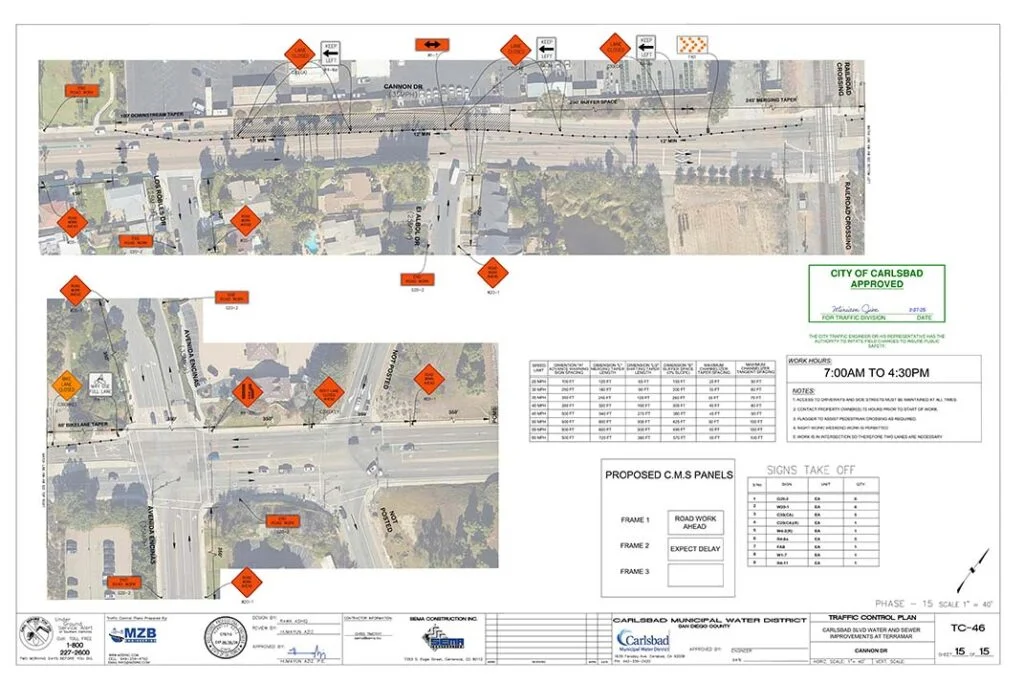
Even experienced teams can run into delays or rejections when preparing Temporary Traffic Control Plans (TTCPs). Small oversights often lead to safety concerns, compliance issues, or costly revisions. Understanding the most common mistakes can help you submit a plan that gets approved quickly and performs effectively in the field.
At MZB Engineering Inc., we’ve reviewed and prepared countless TTCPs, and these are the pitfalls we see most often—and how to avoid them.
1. Inaccurate or Incomplete Site Details
One of the biggest issues is failing to reflect actual site conditions. Missing elements like driveways, signalized intersections, or existing signage can lead to confusion during implementation. Always ensure your base map is current and detailed.
2. Overcomplicated Phasing
Trying to include too many steps on one sheet can overwhelm both reviewers and field crews. Clear, simple phasing—ideally one phase per sheet—makes your plan easier to understand and execute.
3. Ignoring Pedestrian and Cyclist Needs
A TTCP that focuses only on vehicles is incomplete. Overlooking pedestrian pathways or bicycle access can result in non-compliance and unsafe conditions. Always include safe, accessible routes for all users.
4. Incorrect or Missing Signage
Using the wrong sign types, omitting required signs, or failing to label them correctly is a common reason for rejection. Each sign should follow MUTCD standards and be clearly identified with the proper code.
5. Excessive Road Closures
Full closures may seem convenient but often create unnecessary disruption. Agencies typically prefer solutions that maintain traffic flow, such as partial lane closures or staged construction.
6. Poor Placement of Traffic Control Devices
Improperly placed cones, barriers, or channelizers can confuse drivers and increase risk. Devices should align with existing lane markings and guide traffic naturally through the work zone.
7. Lack of Clear Work Description
A vague or missing scope of work can slow down approvals. Be specific about what the project involves—whether it’s trenching, utility installation, or equipment placement—and show it visually where possible.
8. Missing Safety Buffers
Failing to maintain adequate clearance between traffic and work zones—especially around excavations—can create serious hazards. Always include required buffer zones and clearly mark them.
9. Inadequate Sign Spacing
Warning signs that are too far apart—or missing after intersections—reduce their effectiveness. Proper spacing ensures drivers have enough time to react to changing conditions.
10. Not Addressing Surface Conditions
Uneven pavement, steel plates, or elevation changes must be accounted for. Without proper warnings or transitions, these conditions can pose risks to both drivers and workers.
11. Missing Work Schedule Details
Incomplete information about work hours, duration, or traffic control timing can delay approvals. Agencies need a clear understanding of when and how long disruptions will occur.
12. Lack of Contact Information
Every TTCP should include the preparer’s contact details. Missing this information can slow communication during review or construction.
Build Better TTCPs from the Start
Avoiding these common mistakes can significantly improve your approval timeline and ensure safer, more efficient work zones. A well-prepared TTCP not only meets regulatory requirements but also builds trust with agencies and the public.
At MZB Engineering Inc., we specialize in delivering accurate, compliant, and easy-to-implement traffic control plans. From quick turnarounds to ongoing support, our team ensures your TTCP is done right the first time.
Need expert support for your next project? Get in touch with us today.
Comments are closed